Visualizzazione post con etichetta telerik. Mostra tutti i post
Visualizzazione post con etichetta telerik. Mostra tutti i post
lunedì 12 maggio 2014
Great news for developers

Microsoft released Visual Studio Update 2 RTM:
download the web installer
download the offline installer (iso image)
check the full log
The official Windows Phone 8.1 beta for Sqlite extension is out:
download Sqlite extension
Want more?
Telerik gives a free license for Windows Phone and Windows 8 controls:
claim your license
Now it's time to develop Windows Phone 8.1 applications and universal apps :)
[EDIT 15 may]:
A special offer also from Syncfusion:
get wp controls for only 1$

sabato 10 novembre 2012
NowPlaying for Windows Phone
With NowPlaying you can listen your music and share the #NowPlaying hashtag in Twitter, Facebook and the other networks.

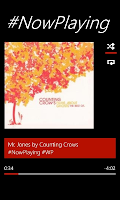

Gestures control:


More features:
Check NowPlaying in the Marketplace and remember to swipe down to share!


Gestures control:
- Open your media library.
- Play or pause the music.
- Move to next or previous song.
- Share your #NowPlaying status.


More features:
- Live Tile customizable with the last song played.
- Select your #NowPlaying style from the default formats or create your own with the simple editor: you have the full control.
- Disable the Lockscreen from the application.
Check NowPlaying in the Marketplace and remember to swipe down to share!
giovedì 13 settembre 2012
Windows Phone - Live Tiles with Telerik
The default Windows Phone framework offers a simple template for tiles:
With Telerik RadControl for Windows Phone you have more power in your hands!
"LiveTileHelper" class helps you to create dynamic live tiles with your own design and your own content.
The "RadExtendedTileData" extends the standard tile data with two properties VisualElement and BackVisualElement.
Now the amazing thing: this properties accept UIElement. Yes, UIElement!!
Now let's code...
You can customize MyUserControl and MyUserControl2 as you want, the only limit is your imagination.
Then, why should you use this controls?
And remember this: a good app, has a good live tile.
- Static background image from application or from url.
- Title.
- Number (top right).
- A back message.
With Telerik RadControl for Windows Phone you have more power in your hands!
 |
| myWeather |
"LiveTileHelper" class helps you to create dynamic live tiles with your own design and your own content.
The "RadExtendedTileData" extends the standard tile data with two properties VisualElement and BackVisualElement.
Now the amazing thing: this properties accept UIElement. Yes, UIElement!!
Now let's code...
LiveTileHelper.CreateOrUpdateTile(
 new RadExtendedTileData()
 {
  Title = "My front title",
  VisualElement = new MyUserControl(),
  BackTitle = "My back title"
  BackContent = "My back message",
  BackVisualElement = new MyUserControl2(),
 },
 new Uri("/MainPage.xaml?param=myparam", UriKind.RelativeOrAbsolute)
);
You can customize MyUserControl and MyUserControl2 as you want, the only limit is your imagination.
Then, why should you use this controls?
- Easyness
- More features
- Time saver
- Support and help
And remember this: a good app, has a good live tile.
Iscriviti a:
Post (Atom)